 GPS MoverDownload
Move your test location along real roads
GPS Mover is an Android developer tool for testing location-based apps. Hold a fixed point, or travel a route at the speed you set.
Download for Android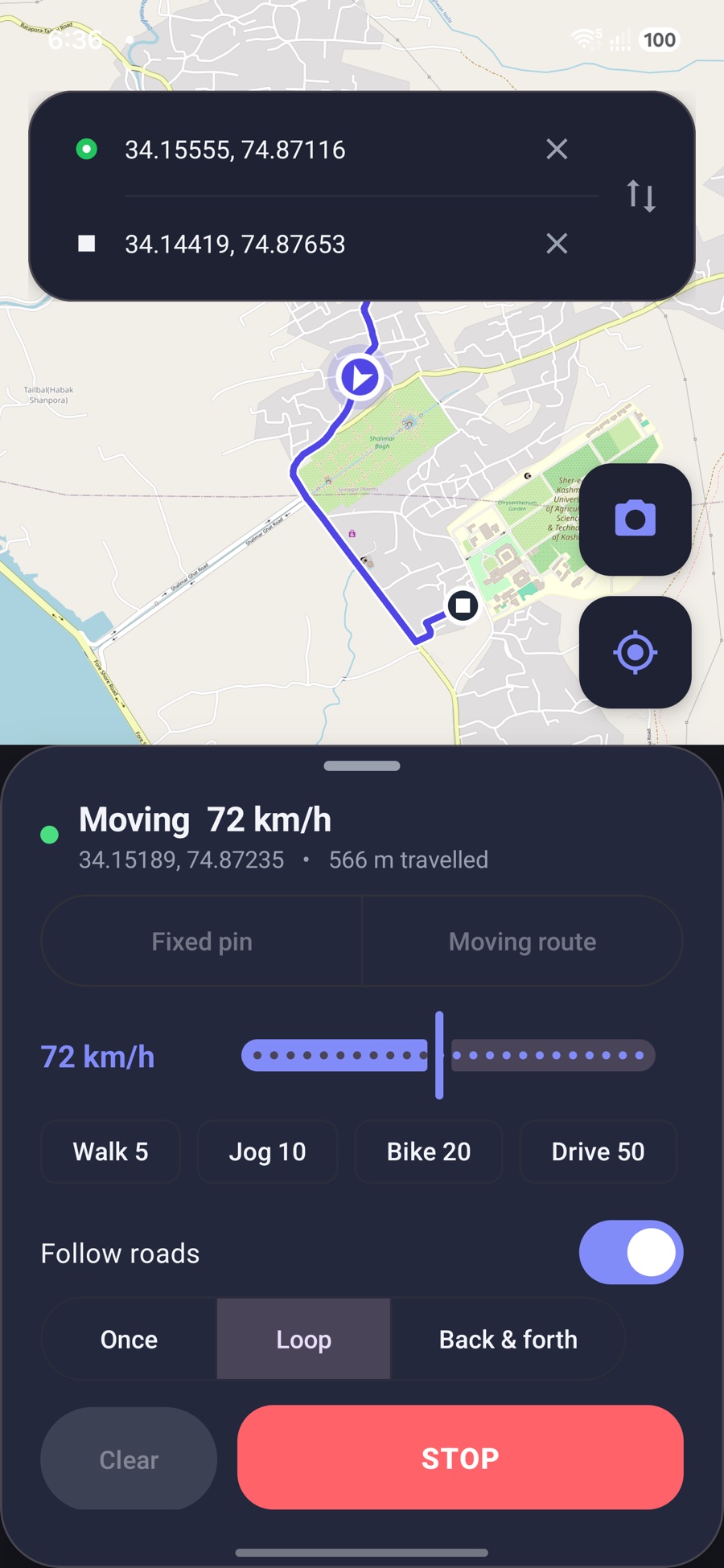
Fixed pin
Hold one location to check how your app behaves in another place.
Moving route
Set a start and destination, then travel from 1 to 150 km/h. Run once, loop, or go back and forth.
Real roads
Routes follow roads and paths from OpenStreetMap, so turns and bearing look like a real trip.
Tagged test photos
Take a photo stamped with the test location and written into its EXIF data.
Set it up once
- Install the app. Android asks you to allow installs from your browser the first time.
- Turn on Developer options. In Settings, open About phone and tap Build number seven times.
- Choose GPS Mover. In Developer options, open Select mock location app and pick GPS Mover.
- Set a location and press START. Press STOP to return to your real location.
Your privacy
No account, ads or analytics. The app does not collect your data. To work, it sends place searches to Nominatim and route points to public OSRM servers, and loads map tiles from OpenStreetMap.
Use it responsibly
This tool is for testing and development. Do not use it to mislead people or to break the rules of another app or service. Some apps detect test locations and may restrict accounts that use them.
Download GPS Mover
Download APK (6 MB)SHA-256: f3b3a9651548ffe7d23ff1e75486e0d5bc5294a4cde8a90bcec619a86a56911c